Input file is composed of records. In the current implementation, each record is represented by one line in input file.
The order of records in file is compulsory, and it has following structure:
- output file record, see section 2.1,
- job description record, see section 2.2,
- analysis record, see section 3,
- domain record, see section 4,
- output manager record, see section 4.1,
- components size record, see section 4.1.1,
- node record(s), see section 4.2,
- element record(s), see section 4.3,
- set record(s), see section 4.4,
- cross section record(s), see section 4.5,
- material type record(s), see section 4.6,
- nonlocal barriers record(s), see section 4.7,
- load, boundary conditions record(s), see section
4.8,
- initial conditions record(s), see section 4.9,
- time functions record(s), see section 4.10.
- optional xfem manager and associated record(s), see section 4.11
When input line begins with '#' character, then it is ignored by the parser and
can serve as a comment inside input file.
The individual records consist of record keyword followed by one or more attributes. Each attribute is identified by
its keyword, which can be followed by attribute value(s). Some attributes have no values.
The order of attributes in the record is optional.
Sometimes, the record keyword itself can be variable, taking on a restricted range of possible values.
As an example, OOFEM has element record, desribing particulat element, and record keyword determines the particular element type.
In this case, the record keyword is preceded by star. We call such record keyword as entity keyword. The possible
substitutions for entity keyword are typed using Typewriter font family.
Often, some attributes are specific to particular entity keyword. Then the general format of record is described and entity specific attributes are described separately. The possible attributes are then union of general and entity specific attributes.

Each attribute value has a specific type, which describe its size and layout. To describe the type of an attribute, the following notation is used:
Keyword #(type), where type determines the attribute type and # is the placeholder for the attribute value.
The possible types of attribute values are following:
- in - integer number.
![\begin{lstlisting}[style=oofem, language=oofeminput, moreemph={val1}]
val1 25
\end{lstlisting}](img3.png)
- rn - real number.
![\begin{lstlisting}[style=oofem, language=oofeminput, moreemph={val2}]
val2 -0.234e-3
\end{lstlisting}](img4.png)
- ch - character (usually for description of unknown type ('d' for
displacement, 't' for temperature, etc.).
![\begin{lstlisting}[style=oofem, language=oofeminput, moreemph={val3}]
val3 t
\end{lstlisting}](img5.png)
- ia - integer array. The format of integer array is
``size val(1) ... val(size)'', where size, val(1),...,val(size) are
integer numbers. Values are separated by one or more spaces. As an example, consider the integer array attribute called nodes
 :
:
![\begin{lstlisting}[style=oofem, language=oofeminput, moreemph={nodes}]
nodes 3 1 4 23
\end{lstlisting}](img7.png)
- ra - real array. The format of real array is
``size val(1) ... val(size)'', where size is integer number and val(1),
..., val(size) are real numbers. Values are separated by one or more spaces. As an example, consider the real array attribute called coords
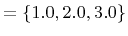 :
:
![\begin{lstlisting}[style=oofem, language=oofeminput, moreemph={coords}]
coords 3 1.0 2.0 3.0
\end{lstlisting}](img9.png)
- rm - real matrix, format of real matrix is
``rows columns {val(1,1) val(1,2) ...; val(2,1) ...}'', where ``rows'' and ``columns'' are integer numbers and val(1,1),
..., are real numbers. Columns are seperated by space or comma and lines by semicolon.
As an example, consider the real matrix attribute called
![$ \texttt{mat1}=\left[\begin{array}{ccc}1.0&-1.0&0.0\\ 2.0&2.5&5.0\end{array}\right]$](img10.png) :
:
![\begin{lstlisting}[style=oofem, language=oofeminput, moreemph={mat1}]
mat1 2 3 \{1.0 -1.0; 0.0 2.0; 2.5 5.0\}
\end{lstlisting}](img11.png)
- dc - dictionary. Dictionary consist of pairs, each pair has key
(character type) and its associated value (integer type).
Format of dictionary is
``size key(1) val(1) ... key(size) val(size)'', where size is integer
number, key(1),...,key(size) are single character values, and val(1),
..., val(size) are real numbers. Values are separated by one or more spaces;
![\begin{lstlisting}[style=oofem, language=oofeminput, moreemph={dict1}]
dict1 2 a 1.0 v 0.0
\end{lstlisting}](img12.png)
- rl - range list. Range list syntax is { number1 .. numberN (start1
end1) (start2 end2)}. The enclosing brackets are compulsory. The range
list represent list of integer values. Single values can be specified
using single values (number1, .., NumberN). The range of values
(all numbers from startI to endI including startI and endI can be
specified using range value in the form (startI endI). The range is
described using its start and end values enclosed in parenthesis.
Any number of ranges and single values can be used to specify range list.
![\begin{lstlisting}[style=oofem, language=oofeminput, moreemph={range1}]
range1 { 1 7 8 (10 20) (25 30) }
\end{lstlisting}](img13.png)
- et - entity type. For example, it describes the finite element
type. Possible type values are mentioned in specific sections.
- s - character string. The string have to be enclosed
in quotes ("") following after corresponding keyword.
![\begin{lstlisting}[style=oofem, language=oofeminput, moreemph={string1}]
string1 \lq\lq string example''
\end{lstlisting}](img14.png)
- expr - function expression. The expression have to be enclosed
in quotes (""). The expression is evaluated by internal parser and
represent mathematical expressions as a function of certain variables.
The variable names and meaning are described in specific sections.
The usual arithmetic operators like -,+,*,/ are supported and their
evaluation order is taken into account. The evaluation order can be
changed using parenthesis. Several built-in functions are supported
(sqrt, sin, cos, tan, atan, asin and acos) - these must be typed using
lowercase letters and their arguments must be enclosed in parenthesis.
![\begin{lstlisting}[style=oofem, language=oofeminput, moreemph={expr1}]
expr1 \lq\lq 2.0*sin(t)/3.0''
\end{lstlisting}](img15.png)
The general format of record is
| record_keyword #(type) |
[attribute1_keyword #(type)] |
|
|
... |
|
|
[attributeXX_keyword #(type)] |
The keywords and their values are separated by one or more spaces. Please note, that a single record cooresponds to one input line in input file.
When some attribute is enclosed in brackets [ ], then it's use is optional
and often overwrites the default behavior or adds additional (but
optional) information or property (for example adds a loading to
node).
If any attribute (and thus its keyword and value) is enclosed within angle brackets 
 then it is related to parallel version of oofem is not available in sequential version.
Example of input record.
As an example, consider the following record description:
| Particle #(in) |
color #(in) mass #(rn) |
|
|
coords #(ra) name #(s) |
The following listing shows the corresponding, properly formatted, input record:

Borek Patzak
2018-01-02


